
Introduction
Vaultwarden is a lightweight, self-hosted alternative to Bitwarden that provides password management with minimal infrastructure overhead.
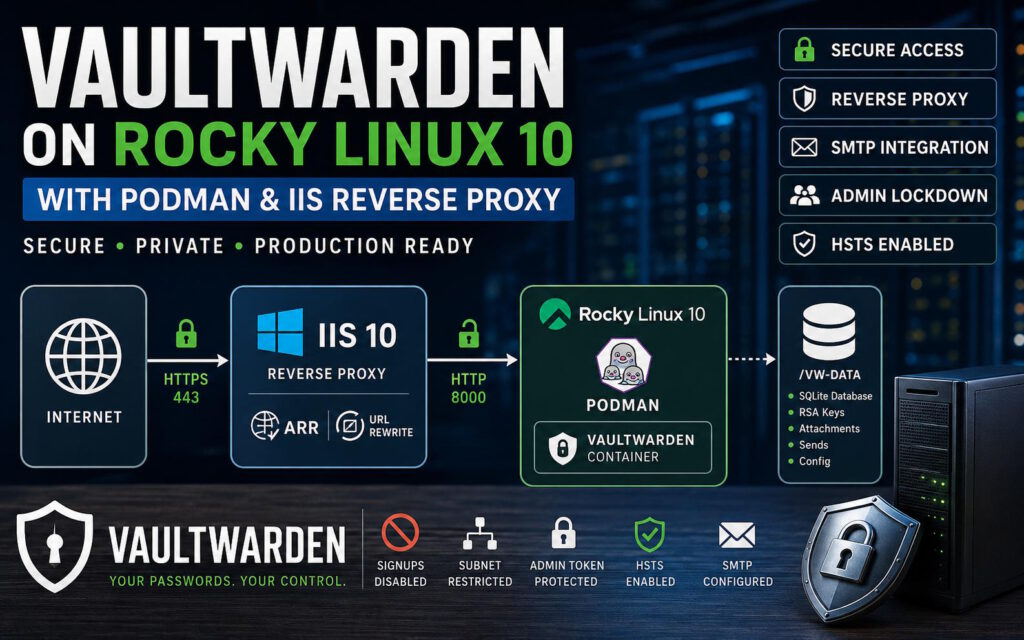
This guide demonstrates a production-ready deployment using:
- Rocky Linux 10 (container host)
- Podman (root-based container runtime)
- IIS 10 (reverse proxy + TLS termination)
- ARR + URL Rewrite
- SMTP integration
- Secure admin access model
- SELinux-compliant storage design
Unlike basic tutorials, this guide includes real operational constraints, failure modes, and production hardening practices.
Architecture Overview
Components
| Component | Role |
|---|---|
| Rocky Linux 10 | Hosts container runtime |
| Podman | Runs Vaultwarden container |
| IIS 10 | Reverse proxy + TLS termination |
| ARR + URL Rewrite | HTTP forwarding engine |
| SMTP server | Email delivery |
| SQLite | Vaultwarden database |
Network Design Example
| System | Example IP |
|---|---|
| IIS Reverse Proxy | 192.168.10.20 |
| Vaultwarden Host | 192.168.10.50 |
| Internal Network | 192.168.10.0/24 |
| Public Domain | vault.example.com |
Traffic Flow
Internet
   ↓ HTTPS (443)
IIS Reverse Proxy (192.168.10.20)
   ↓ HTTP (8000)
Vaultwarden Container (192.168.10.50)
Rocky Linux 10 Preparation
Install Podman
sudo dnf update -y
sudo dnf install podman -y
Verify:
podman --versionVaultwarden Data Directory (CRITICAL SECTION)
Vaultwarden stores ALL persistent data in a single directory:
/vw-dataCreate directory
mkdir /vw-data
chmod 700 /vw-data
What /vw-data contains
| File | Purpose |
|---|---|
| db.sqlite3 | Main database |
| rsa_key.pem | Encryption keypair |
| attachments/ | File uploads |
| sends/ | Secure file sharing |
| tmp/ | Temporary data |
⚠️ SELinux requirement (IMPORTANT)
On Rocky Linux 10, SELinux WILL block writes unless corrected.
Fix:
chcon -Rt container_file_t /vw-dataOR ensure Podman mount includes:
-v /vw-data:/data:ZWhy this matters
Without this:
- RSA key generation fails
- SQLite locks fail
- container exits on startup
Pull Vaultwarden Image
podman pull vaultwarden/server:latestEnvironment Configuration
Create:
nano /vw-data/vaultwarden.envProduction Environment File
DOMAIN=https://vault.example.com
ADMIN_TOKEN=replace_with_strong_random_value
SIGNUPS_ALLOWED=false
IP_HEADER=X-Forwarded-For
SMTP_HOST=mail.example.com
SMTP_FROM=vault@example.com
SMTP_FROM_NAME=Vaultwarden
SMTP_SECURITY=force_tls
SMTP_PORT=465
SMTP_USERNAME=vault@example.com
SMTP_PASSWORD=your_password
Configuration Behavior (IMPORTANT)
Vaultwarden config precedence
- Environment variables (container runtime)
- config.json (if present)
- internal defaults
⚠️ Critical rule
Changes to
.envDO NOT apply to running containers.
You must recreate the container.
Starting Vaultwarden
podman run -d \
  --name vaultwarden \
  -e DOMAIN="https://vault.domain.tld" \
  -v /vw-data:/data:Z \
  --restart unless-stopped \
  -p 127.0.0.1:8000:80 \
  vaultwarden/server:latest
Container Lifecycle Reality
First run behavior
- Generates
rsa_key.pem - Initializes SQLite database
- Creates folder structure
Restart behavior
- Keeps existing data
- DOES NOT reload env changes
IIS Reverse Proxy Configuration
Required IIS Modules
- URL Rewrite
- Application Request Routing (ARR)
- WebSocket Protocol
- IP and Domain Restrictions
Enable ARR Proxy
IIS Manager → Server → Application Request Routing Cache
→ Server Proxy Settings → Enable Proxy ✔
Web.config (Production Ready)
<?xml version="1.0" encoding="UTF-8"?>
<!--
  ============================================================================
  Vaultwarden reverse proxy : IIS + Application Request Routing
  ============================================================================
  DESIGN POSTURE: transparent proxy.
  IIS is responsible for exactly three things:
    1. Terminating TLS
    2. Gating /admin by source IP
    3. Forwarding everything to the backend, unmodified
  IIS is explicitly NOT responsible for:
    Interpreting or replacing backend responses  (broke JSON error bodies)
    Compressing responses                        (backend already gzips)
    Setting security headers the backend sets    (produces duplicates)
    Serving error pages                          (requires interception)
  EXCEPTION: Access Control Allow Origin for browser extension callers.
  Vaultwarden's own CORS layer (src/util.rs, get_allowed_origin) only ever
  grants this header when Origin exactly matches DOMAIN, "file://" (Safari),
  or "bw-desktop-file://bundle" (the desktop app). chrome-extension:// and
  moz-extension:// origins are never included, by design, on the currently
  released backend. See RULE 4 (OUTBOUND) below. This is the one place IIS
  sets a header the backend itself is responsible for, because the backend
  cannot be made to set it for this caller type without a custom build.
  SCOPE CONTRACT: this file contains only configuration sections delegated to
  site level by default in IIS. It has no dependency on server level state.
  Anything requiring applicationHost.config lives in the prerequisites script
  and must be applied first.
  XML NOTE: comments here use "=" for decoration, never runs of hyphens. The
  sequence of two hyphens is illegal anywhere inside an XML comment body and
  causes IIS to fail the whole site with HTTP 500.19.
  PREREQUISITES (see the .ps1):
    ARR installed, proxy enabled
    WebSocket Protocol feature installed
    ARR responseBufferLimit = 0
    ARR timeout raised above the 30s default
    HTTP_X_FORWARDED_PROTO / HTTP_X_FORWARDED_HOST / HTTP_X_FORWARDED_FOR
    allowlisted as rewrite server variables
  BACKEND CONFIGURATION (Vaultwarden env / config.json):
    DOMAIN     = https://vault.homenode.in     (must match the public URL exactly)
    IP_HEADER  = X-Forwarded-For
  Set IP_HEADER on the backend rather than emitting X-Real-IP here. Referencing
  a server variable that is not allowlisted causes URL Rewrite to fail every
  request with a 500. The backend setting achieves the same result with no IIS
  surface area.
  ============================================================================
-->
<configuration>
    <system.webServer>
        <!--
          ====================================================================
          REWRITE RULES
          Ordered, each terminal. Rule 2 is the only policy decision IIS makes.
          ====================================================================
        -->
        <rewrite>
            <rules>
                <!--
                  RULE 1 : Force HTTPS
                  No op if the site only binds 443. Harmless to keep.
                -->
                <rule name="ForceHttps" stopProcessing="true">
                    <match url="(.*)" />
                    <conditions>
                        <add input="{HTTPS}" pattern="^OFF$" />
                    </conditions>
                    <action type="Redirect"
                            url="https://{HTTP_HOST}/{R:1}"
                            redirectType="Permanent" />
                </rule>
                <!--
                  RULE 2 : Restrict /admin to management subnets
                  Returns a bodiless 403. No error page is served: every
                  mechanism for serving one requires httpErrors interception,
                  which is what corrupted the API error bodies.
                  IMPORTANT. {REMOTE_ADDR} is the IP of whatever connects
                  directly to IIS. If another proxy sits in front (OPNsense, a
                  load balancer, Cloudflare), this evaluates that proxy address
                  and the gate is meaningless. In that case swap the input to
                  {HTTP_X_FORWARDED_FOR} AND ensure the upstream proxy strips
                  any client supplied XFF header, or the gate is trivially
                  spoofable.
                  Subnets allowed: 172.16.28.0/24, 172.16.29.0/24,
                  172.16.30.0/24, 172.16.31.0/24, 10.20.28.0/24
                -->
                <rule name="RestrictAdmin" stopProcessing="true">
                    <match url="^admin(/.*)?$" />
                    <conditions logicalGrouping="MatchAll">
                        <add input="{REMOTE_ADDR}"
                             pattern="^(172\.16\.(2[89]|3[01])\.[0-9]{1,3}|10\.20\.28\.[0-9]{1,3})$"
                             negate="true" />
                    </conditions>
                    <action type="CustomResponse"
                            statusCode="403"
                            statusReason="Forbidden"
                            statusDescription="Forbidden" />
                </rule>
                <!--
                  RULE 3 : Proxy everything to Vaultwarden
                  Covers /notifications/hub (WebSocket) implicitly. On
                  Vaultwarden 1.30 and later the hub is on the main port, so no
                  separate rule for 3012 is needed.
                  X-Forwarded-Proto is not optional: without it Vaultwarden
                  builds http URLs behind an https frontend, and the vault
                  loads but does not populate data.
                  X-Forwarded-For is SET, not appended. Correct only when IIS
                  is the edge. If it is not, see the note on Rule 2.
                -->
                <rule name="ProxyToVaultwarden" stopProcessing="true">
                    <match url="(.*)" />
                    <serverVariables>
                        <set name="HTTP_X_FORWARDED_PROTO" value="https" />
                        <set name="HTTP_X_FORWARDED_HOST"  value="{HTTP_HOST}" />
                        <set name="HTTP_X_FORWARDED_FOR"   value="{REMOTE_ADDR}" />
                    </serverVariables>
                    <action type="Rewrite"
                            url="http://192.168.10.50:8000/{R:1}" />
                </rule>
            </rules>
            <!--
              ======================================================================
              RULE 4 (OUTBOUND) : CORS for browser extensions
              Vaultwarden's CORS layer only grants Access Control Allow Origin
              when the request Origin exactly matches DOMAIN, "file://"
              (Safari), or "bw-desktop-file://bundle" (the desktop app).
              chrome-extension:// and moz-extension:// origins are never
              included on the currently released backend, so the browser
              extension's preflight and API calls fail CORS even though
              Vaultwarden answers them successfully underneath. Confirmed by
              comparing a direct-to-backend OPTIONS request against one routed
              through this site: identical response, header missing in both,
              so this is a backend limitation, not something upstream of here.
              See https://github.com/dani-garcia/vaultwarden/issues/4665.
              Two headers are backfilled here, not one. Access Control Allow
              Origin is reflected from the caller's actual Origin; a wildcard
              is not legal once credentials are involved, per the CORS spec.
              Access Control Allow Credentials is forced to "true" as well,
              because Vaultwarden only emits that value reliably on the
              OPTIONS preflight; on the real GET/POST response it has been
              observed coming back empty rather than "true", which fails the
              browser's check on the actual request even after the preflight
              passes. Forcing it here is safe under this precondition only:
              once an extension origin has already been granted access at
              all, "true" is the only value that header should ever carry.
              Scoped to extension URL schemes only, not to any origin. A
              regular web page cannot forge an Origin of chrome-extension://...
              or moz-extension://... ; the browser itself sets that value only
              for an actual installed extension, so this does not open the API
              to arbitrary third party web origins.
              ======================================================================
            -->
            <outboundRules>
                <preConditions>
                    <preCondition name="IsExtensionOrigin">
                        <add input="{HTTP_ORIGIN}"
                             pattern="^(chrome|moz|edge|safari-web)-extension://" />
                    </preCondition>
                </preConditions>
                <rule name="AllowExtensionCORSOrigin" preCondition="IsExtensionOrigin">
                    <match serverVariable="RESPONSE_Access_Control_Allow_Origin"
                           pattern=".*" />
                    <action type="Rewrite" value="{HTTP_ORIGIN}" />
                </rule>
                <rule name="AllowExtensionCORSCredentials" preCondition="IsExtensionOrigin">
                    <match serverVariable="RESPONSE_Access_Control_Allow_Credentials"
                           pattern=".*" />
                    <action type="Rewrite" value="true" />
                </rule>
            </outboundRules>
        </rewrite>
        <!--
          ====================================================================
          ERROR HANDLING : do not change this element
          existingResponse="PassThrough" is the single most important line in
          this file. The IIS default is "Auto", which does NOT mean "preserve
          responses that have a body". Auto preserves a response only when the
          producing module sets the SetStatus flag, and ARR does not set it on
          proxied responses. Under Auto, IIS replaces the body of every 4xx and
          5xx from Vaultwarden with an HTML error page, so clients parsing JSON
          fail on:
              400 carrying TwoFactorProviders
              401 driving the refresh token exchange
              any API error response
          This element must be present. Omitting it does not disable error
          handling; it falls back to the "Auto" default and reintroduces the
          fault.
          ====================================================================
        -->
        <httpErrors errorMode="Custom" existingResponse="PassThrough" />
        <!--
          ====================================================================
          COMPRESSION : disabled
          Vaultwarden compresses its own responses. IIS re-compressing proxied
          content risks double encoding and has known browser side consequences
          for attachment downloads. A reverse proxy should not re-encode a body
          it did not generate.
          ====================================================================
        -->
        <urlCompression doStaticCompression="false"
                        doDynamicCompression="false" />
        <!--
          ====================================================================
          REQUEST FILTERING
          maxAllowedContentLength raised from the 28.6 MB default for
          attachments and Sends. 512 MB here; keep it at or above the backend
          own limit.
          This governs the request BODY only. Large uploads also require the
          ARR timeout raised past 30s (see the prerequisites script) or they
          will 502 mid transfer.
          ====================================================================
        -->
        <security>
            <requestFiltering removeServerHeader="true">
                <requestLimits maxAllowedContentLength="536870912" />
            </requestFiltering>
        </security>
        <!--
          ====================================================================
          RESPONSE HEADERS : minimal by design
          Only headers IIS uniquely owns are set here. Vaultwarden emits its
          own CSP, X-Content-Type-Options, X-Frame-Options and Referrer-Policy.
          IIS customHeaders APPENDS rather than replaces, so adding them here
          yields doubled values such as "SAMEORIGIN, SAMEORIGIN", which some
          browsers reject, breaking the web vault while leaving native clients
          unaffected.
          HSTS is set here because TLS terminates here and the backend has no
          way to know the connection was HTTPS.
          "preload" is deliberately absent. It is a commitment covering the
          entire apex domain and every subdomain, requires separate submission,
          and cannot be undone on any useful timescale.
          X-Frame-Options is intentionally NOT set: FIDO2 WebAuthn requires
          SAMEORIGIN rather than DENY, and the backend already handles this.
          ====================================================================
        -->
        <httpProtocol>
            <customHeaders>
                <remove name="X-Powered-By" />
                <remove name="Strict-Transport-Security" />
                <add name="Strict-Transport-Security"
                     value="max-age=31536000; includeSubDomains" />
            </customHeaders>
        </httpProtocol>
    </system.webServer>
</configuration>
WebSockets Requirement
Vaultwarden uses WebSockets for:
- Real-time sync
- Login session updates
- Device notifications
Without WebSockets:
- UI updates delay
- Mobile sync issues
SMTP Configuration Notes
Valid values only:
| Mode | Port | Security |
|---|---|---|
| STARTTLS | 587 | starttls |
| SMTPS | 465 | force_tls |
Invalid configuration example
SMTP_SECURITY=ssl ❌This causes startup failure.
Admin Panel Security
Enable admin panel
ADMIN_TOKEN=strong_random_valueAccess:
https://vault.example.com/adminSecurity model
- Admin is NOT user-authenticated
- It is token-based only
- Must never be publicly exposed
Restricting Access (Production Model)
Recommended approach
✔ Restrict entire Vaultwarden to internal network:
172.16.28.0/22Configured via IIS:
- IP Address and Domain Restrictions
- Deny all unspecified clients
- Allow internal subnet only
Backup Strategy
Backup command
tar czf vaultwarden-backup.tar.gz /vw-dataRestore procedure
systemctl stop podman-vaultwarden
tar xzf vaultwarden-backup.tar.gz -C /
systemctl start podman-vaultwarden
Common Failure Scenarios
1. Permission denied (rsa_key.pem)
Cause:
- SELinux blocking write
Fix:
chcon -Rt container_file_t /vw-data2. SMTP_SECURITY crash
Cause:
- invalid value (e.g. “ssl”)
Fix:
- use
force_tlsorstarttls
3. ENV changes not applying
Cause:
- container not recreated
Fix:
podman rm -f vaultwarden
podman run ...
4. Admin panel disabled
Cause:
- missing ADMIN_TOKEN
Fix:
- set token + recreate container
Security Recommendations
- Disable public signups
- Restrict admin panel to internal network
- Enable HSTS
- Use HTTPS only at IIS
- Pin Vaultwarden version (avoid
latest) - Regular backups of
/vw-data
Final Thoughts
Vaultwarden combined with Podman and IIS provides a lightweight but production-capable password management system. However, its reliability depends heavily on:
- correct SELinux configuration
- proper container lifecycle management
- secure reverse proxy setup
- strict admin access control
When correctly configured, it is suitable for enterprise-grade internal deployments without requiring the complexity of the official Bitwarden stack.