
A researched, source-validated breakdown of the persistent Windows fingerprint that surfaced in the July 2026 Scattered Spider federal complaint. Every technical layer below has been cross-checked against the primary court record, Microsoft’s own documentation, independent reverse engineering, and security journalism.
Summary
- The GDID is a real, documented telemetry item. It appears in the United States federal criminal complaint United States v. Peter Stokes (N.D. Ill., July 2026) as
Global Device Identifier g:6755467234350028. - It is a server-assigned Microsoft Account “Device PUID.” A 64-bit Passport Unique ID that Microsoft’s servers assign to a Windows installation, written in the device graph as
g:<decimal>. - The viral claims were wrong. It is not a 128-bit value and it is not “generated from hardware serial numbers.” The court record states that a clean reinstall produces a new GDID, which rules out derivation from fixed hardware.
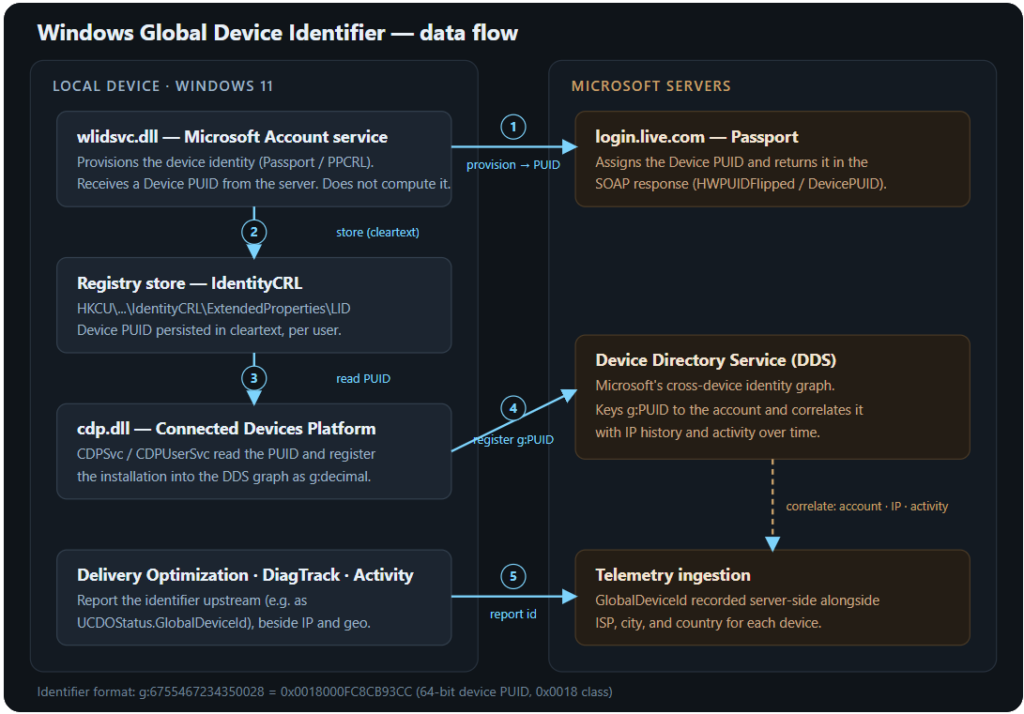
- The pipeline, bottom to top: the Microsoft Account service (
wlidsvc) provisions the device againstlogin.live.comand receives a Device PUID → the value is stored in the registry in cleartext → the Connected Devices Platform (cdp.dll/CDPSvc) registers it into the Device Directory Service graph → Delivery Optimization reports it as the documentedUCDOStatus.GlobalDeviceId. - It cannot be fully removed on a normal, activated, Microsoft-Account-bound Windows install. Exposure can be reduced substantially, but the identifier answers to Microsoft’s servers, and records that were already created persist server-side.
1. Background: what the court record actually said
On July 1, 2026 the U.S. Department of Justice unsealed a criminal complaint against Peter Stokes, a 19-year-old dual U.S.–Estonian citizen alleged to be a member of the cybercrime group Scattered Spider (also tracked as Octo Tempest, UNC3944, and 0ktapus). The complaint describes how Microsoft records helped the FBI attribute online activity to a specific Windows device across VPNs, proxy servers, and several countries.
According to the affidavit, a Global Device Identifier in the Windows ecosystem is described by a Microsoft representative as a persistent, device-level identifier designed to uniquely identify an installation of a Windows operating system on a device. The record adds that a GDID stays consistent across operating-system updates, but that a reinstall of Windows is tied to a new, unique GDID and that a single Microsoft user can hold multiple GDIDs over time.Paraphrased from the public criminal complaint, United States v. Peter Stokes, N.D. Ill., 2026
Two facts from the record carry the rest of this analysis. First, the value is the letter g, a colon, and a decimal integer (g:6755467234350028). Converted to hexadecimal that is 0x0018000FC8CB93CC a 64-bit number. (This conversion has been independently verified for this paper.) Second, a reinstall produces a new GDID, so the value cannot simply be a function of unchanging hardware.
2. Debunking the viral narrative
When the case broke, a widely shared social-media summary claimed the GDID was “a 128-bit identifier generated from serial numbers on install.” Both halves are demonstrably false when checked against the primary source.
| Viral claim | What the evidence shows |
|---|---|
| “128-bit identifier” | The value in the complaint, g:6755467234350028, is a decimal that fits in 64 bits (0x0018000FC8CB93CC). |
| “Generated from serial numbers on install” | The complaint states a reinstall produces a new GDID. A value hashed from fixed serials would reproduce the same number after a reinstall, not change. |
3. The architecture, validated layer by layer
The identifier’s life can be split into four stages: it is minted by Microsoft’s servers, stored locally, registered into a cloud identity graph, and reported through telemetry. Each stage below is marked with the strongest source that confirms it.
3.1 The mint Microsoft Account service (wlidsvc) [server-assigned]
The Microsoft Account / Passport service (wlidsvc.dll) is the component that provisions a device identity. When a device is provisioned, it performs a Passport SOAP exchange with login.live.com and pulls a Device PUID (Passport Unique ID) out of the server’s response body. The client does not compute the identifier from anything on the machine; it receives a string and stores it. This is the technical reason a reinstall yields a new GDID: a reinstall triggers new provisioning, and the server assigns a fresh PUID. The server-assigned nature of the identifier is directly supported by the court record itself a reinstall produces a new value, which a hash of fixed hardware could not do. The specific binary-level path (wlidsvc parsing a Device PUID out of the SOAP response body) comes from public reverse-engineering research, and is consistent with Microsoft’s long-established Passport / PPCRL device-authentication design, in which the client obtains tokens and identifiers from login.live.com rather than computing them locally. Independent security journalism subsequently fact-checked and corroborated the same model against the complaint.
3.2 Storage registry, in cleartext [reproduced live]
The provisioned Device PUID is written into the user’s own registry hive in plain text. Independent researchers report it at:
HKCU\SOFTWARE\Microsoft\IdentityCRL\ExtendedProperties
    LID = 0018XXXXXXXXXXXX

HKCU\SOFTWARE\Microsoft\IdentityCRL\Immersive\production\Token\{...}
    DeviceId = 0018XXXXXXXXXXXX
The reverse-engineering research reports that a device PUID sits in a 0018 high-word class, while a user-account PUID (the CID) sits in a separate 0003 class. The court’s GDID (0x0018000FC8CB93CC) falls in the 0018 device space. This prefix taxonomy is currently supported by a single research source rather than official documentation, and is treated here as a strong inference rather than an established fact.
3.3 Registration Connected Devices Platform to the Device Directory Service [static analysis + live capture]
The Connected Devices Platform (cdp.dll, running as the services CDPSvc and CDPUserSvc) is the same background subsystem that powers Phone Link, cloud clipboard, and Nearby Share. It reads the stored PUID and registers the installation into Microsoft’s Device Directory Service (DDS) the cross-device identity graph behind those features where the value is keyed as g:<decimal>. Analysis of the binary shows that CDP consumes the identifier as an opaque string handed up from the identity stack; it does not compute it. Live tracing of the platform’s own event providers captured the full registration handshake against DDS endpoints returning HTTP 200.
3.4 Reporting Delivery Optimization [Microsoft primary documentation]
This is the one place Microsoft names the value in public documentation. The Azure Monitor reference for Delivery Optimization defines a GlobalDeviceId column in the UCDOStatus table, described in a single sentence as a “Microsoft global device identifier” used internally. Crucially, per the same published schema, that column sits in a table that also carries the device’s approximate City and Country both explicitly documented as derived from the device’s IP address an ISP estimation, and a LastCensusSeenTime that records when the device last sent data to Microsoft. In other words, Microsoft’s own documentation shows a persistent device identifier being reported next to where the device is and how it connects. Delivery Optimization only reports the value; it does not own or generate it, and this enterprise reporting table is not the mechanism by which a device is tracked it is simply the one place the value is publicly named.
4. How it is designed, the full pipeline
5. An important correction to the popular understanding
Much of the early coverage and some of the reverse-engineering framing implied that the identifier is created only when a person signs in with a Microsoft Account, and that using a local account therefore prevents it entirely. The evidence indicates this is too simple.
The device-provisioning machinery in wlidsvc is architecturally a device identity operation, distinct from a user signing in. Two data points suggest the device identity can be provisioned independently of an interactive account sign-in. First, the original researcher noted a report that the identifier is transmitted regardless of whether the device is signed into a Microsoft Account. Second, and more concretely, the activation-tooling community has observed that Windows setup itself sends hardware information to Microsoft and receives identifiers in return the same tokens later used for Store access and licensing and has stated that it is not possible to prevent Windows from obtaining a GDID without breaking activation and Store/UWP applications.
The practical consequence is significant: signing in with a Microsoft Account is what binds the device identity to a named person, which is what turns “a device” into “an individual.” But the identity itself may be minted earlier, during activation, and may exist even on a machine that never sees an interactive account sign-in. Whether a fully offline, local-account-only installation still provisions a device ticket is the one genuinely open question, and it can be checked empirically per machine by inspecting whether the LID value is ever populated.
6. Confidence and source validation
| Claim | Strongest supporting evidence | Confidence |
|---|---|---|
GDID exists and reads g:6755467234350028 | Primary court record; multiple independent news reports | Confirmed |
Value is 64-bit (0x0018000FC8CB93CC), not 128-bit | Direct conversion, independently verified | Confirmed |
| Persistent across updates; new on reinstall; one user can hold several | Court record (Microsoft representative) | Confirmed |
Server-assigned, not hardware-derived; obtained via wlidsvc / login.live.com | Court record (reinstall → new value) plus reverse engineering, consistent with documented MSA/Passport provisioning | Confirmed (behavior); credible (binary path) |
| Stored in cleartext in the user registry hive | Reproduced live by reverse-engineering research | Confirmed |
Registered into DDS by CDP as g:decimal | Static analysis plus live event tracing (single research effort) | Credible |
Reported as UCDOStatus.GlobalDeviceId | Microsoft’s own Azure Monitor documentation | Confirmed |
| Identifier reported beside IP-derived City / Country and ISP | Microsoft’s published UCDOStatus schema | Confirmed |
| Device identity may be provisioned without an interactive MSA sign-in | Activation-tooling observations; researcher report | Strong inference |
0018 = device / 0003 = user PUID prefix taxonomy | Single reverse-engineering source | Plausible, unconfirmed |
| Exact disassembly offsets | Single source; build-specific | Good faith, unverifiable externally |
7. Implications for individual privacy
The mechanism is not exotic, and a persistent device identity is a defensible thing for an operating system to maintain for activation, licensing, fraud prevention, and cross-device continuity. The privacy concerns are not about the existence of an identifier so much as about its visibility, consent, persistence, and correlation power. Several implications follow directly from the design above.
7.1 A transparency and consent deficit
Before this case, the term was essentially undocumented for the public. Microsoft’s only public mention is a single sentence in an enterprise Azure Monitor reference intended for IT administrators pulling update reports not a privacy disclosure aimed at ordinary users. There is no consent prompt when the identifier is assigned, and no documented user-facing off switch. This stands in contrast to mobile advertising identifiers: Apple’s advertising identifier requires an App Tracking Transparency prompt and offers a visible reset, and Android’s works similarly. The Windows device identifier has neither an equivalent prompt nor a reset control.
7.2 Persistence and server-side relinkability
The identifier survives operating-system updates by design. A clean reinstall produces a new value, which sounds like a privacy reset, but it is a weak one: because the graph lives on Microsoft’s servers, the new identifier can be linked back to the old one through the same account, activation history, and cloud-storage associations. The rotation happens on the client; the correlation happens in the cloud, where the individual has no control.
7.3 Cross-context correlation why it defeats a VPN
This is the core of the privacy harm and the reason the identifier was decisive in the underlying case. A VPN hides a network path; it changes the IP address a service sees. The device identifier travels with the operating-system installation itself, not with the network connection. So when the same installation appears behind many different IP addresses over time, the identity stitches those sessions together regardless of how the traffic was routed. Lined up against timestamps of logins to ordinary consumer accounts, that produces a movement-and-activity profile that no amount of IP rotation obscures. The capability that links a device across countries for an investigation is the same capability that could profile an ordinary person across contexts they believed were separate. This is not speculative about what is recorded: Microsoft’s own published schema shows the identifier reported in a table that also holds the device’s approximate city and country, both documented as derived from its IP address. Location and persistent identity are, by design, reported together.
7.4 Scale and asymmetry
The mechanism is present across the Windows installed base on the order of a billion-plus devices. Combined with the absence of a consent prompt or reset, this creates an asymmetry: the identity is easy for the platform to generate and correlate, and difficult for the individual to see, control, or remove. Security researchers reacting to the case raised two further open questions worth noting how much comparable identity exists on other platforms, and whether such identifiers are, or could become, more permanently tied to hardware.
7.5 Retention and lawful access
Because the correlation is held server-side, it is subject to lawful process. As in the underlying case, records associating a device identity with IP history and activity can be produced in response to legal demands. This is not unique to Microsoft every major platform holds some persistent device identity and can be compelled to disclose records but it underscores that client-side settings do not retract data that already exists on the platform’s side.
8. What individuals can realistically do
Actions map to the same lifecycle stages shown in Figure 1. Only the first stage actually prevents the identifier from existing; the rest reduce how much it is synchronized and transmitted. None of them retract records already held server-side. Each carries trade-offs, stated honestly below.
Stage 1 – Prevent the identifier from being minted (the only true removal)
- Avoid adding a Microsoft Account; use a local account so the device identity is never bound to a named person.
- Editions with minimal Store/UWP dependence (for example, the long-term-servicing enterprise SKUs) reduce how much of the platform relies on the identity flow.
- Trade-off: per activation-tooling observations, preventing the identifier entirely tends to break activation and Store/UWP applications. And because provisioning may occur at setup, a local account alone may not stop the identity being minted individuals can verify on their own machine by checking whether the registry value is ever populated.
Stage 2 – Reduce registration and reporting
- Disable the Connected Devices Platform services (
CDPSvc,CDPUserSvc) to stop graph registration this also disables Phone Link, cloud clipboard, and Nearby Share. - Disable Delivery Optimization’s peer service to remove that reporting path, and disable the Connected User Experiences and Telemetry service (
DiagTrack). - Turn off Activity History, and set diagnostic data to the lowest available tier. Note the ceiling: the very lowest telemetry setting is only fully honored on enterprise and education editions; on consumer editions a “required” floor remains.
- In Settings, turn off optional diagnostic data, the advertising identifier and personalized-ads toggles, and cloud content search.
Stage 3 – Network-level containment
- The graph and telemetry endpoints (the Device Directory Service hosts, the activity endpoint, and the diagnostic-ingestion hosts) can be blocked at the network level using a firewall or a DNS sinkhole.
- Trade-off: the sign-in and activation endpoint should not be blocked, because doing so breaks account sign-in and licensing and it is the one endpoint most central to minting. Microsoft also uses fallback behaviour for some telemetry, so DNS blocking alone can leak, and aggressive blocking can break updates and Store functionality.
The honest bottom line
On a normal, activated, Microsoft-Account-bound Windows installation, the identifier cannot be fully removed. An individual can either prevent it from being minted at the cost of activation and Store/UWP functionality, and subject to the open question about setup-time provisioning or accept that it exists and block its synchronization and transmission. What no client-side action can do is retract identities that were already minted and registered, because those live in Microsoft’s graph. For a threat model that genuinely requires an unlinkable device for example, sensitive journalism, activism, or protection from a domestic abuser the only robust answer is not to run the sensitive workload on a Microsoft-Account-bound Windows install at all: a local-only, minimal-edition installation, or a different operating system, for anything that must stay unattributed.
9. How to inspect the identifier on a given machine
On a machine signed into a Microsoft Account, the device PUID can be read from the user’s own hive with a single registry query (no administrator rights required):
(Get-ItemProperty 'HKCU:\SOFTWARE\Microsoft\IdentityCRL\ExtendedProperties').LID

# to view it in the g:decimal form used server-side:
$hex = (Get-ItemProperty 'HKCU:\SOFTWARE\Microsoft\IdentityCRL\ExtendedProperties').LID
"g:$([Convert]::ToUInt64($hex,16))"
Caution: a device PUID, a user CID, and a user security identifier can all help deanonymize the person behind a machine. Anyone documenting their own value publicly should redact it. The only value safe to quote is the one already in the public court record.
10. Methodology and sources
The technical model in this paper was assembled from four independent classes of evidence and cross-checked for agreement: the public federal court record (the primary source for the identifier’s existence, format, and persistence behavior); Microsoft’s own Azure Monitor documentation (the only official naming of the value, cross-checked directly against the live schema for this paper); public reverse-engineering research that read the relevant Windows binaries and reproduced the registry and network behavior on a live system, whose binary-level findings are consistent with Microsoft’s documented MSA/Passport device-authentication design; and contemporaneous security journalism that independently fact-checked the model against the court record. Claims are marked in Section 6 by the strongest source supporting each one, with single-source items flagged as inference rather than fact.
- Microsoft Learn – Azure Monitor Logs reference,
UCDOStatustable (defines theGlobalDeviceIdcolumn): learn.microsoft.com/…/tables/ucdostatus - Public reverse-engineering writeup – gdid-reversal: github.com/SmtimesIWndr/gdid-reversal
- Independent fact-check and reverse-engineering corroboration Windows Latest: windowslatest.com
- Additional coverage – The Register, The Hacker News, iTnews, Cybernews, Tom’s Hardware, Proton (case background and independent reporting).
This paper is for educational and privacy-research purposes. It concerns a publicly documented Windows mechanism and information already in the public court record. It is not legal advice. Service names, registry paths, and behavior may change across Windows builds; individuals should verify current behavior on their own systems before relying on any step described here.